Sunday, November 11, 2007

Thing 7 - Create Your Own Blog and Add Your First Posts

Now, you have a better idea of what web 2.0 means. You're ready to get started using web 2.0 tools. You’ve done some exploring around this website and understand how this program works; it’s time to setup your very own personal blog. You will use this blog to record your thoughts, discoveries and exercises.


For this program, I recommend that you use Blogger*, a popular free online blog hosting service that is extremely easy to use. You may choose to use another blogging software tool. Before creating your blog, please read the IMPORTANT NOTE at the bottom of this post.

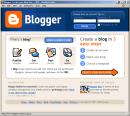
To create a blog using Blogger, it takes just three steps:
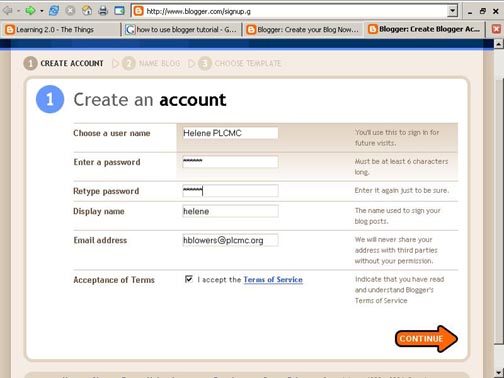
  1. Create an account (view screenshot)

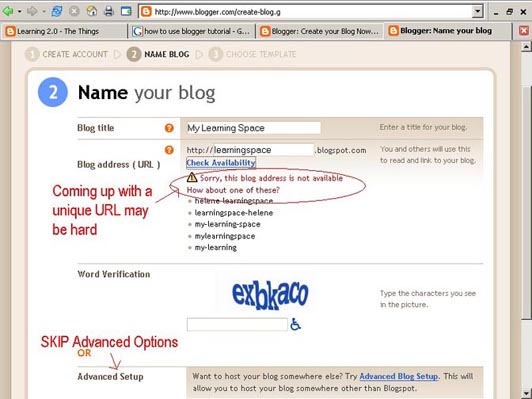
  2. Name your blog (view screenshot)
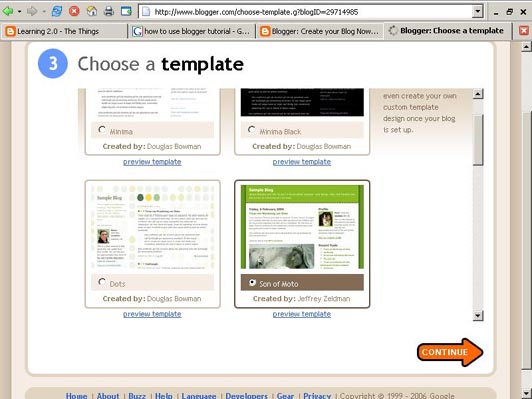
  3. Select your template. (view screenshot)

Once you’ve created your blog here are two important things to know:


To add posts:


The maintenance interface that you will use to add posts, edit or change the step-up your blog is accessed online at http://www.blogger.com/. Be sure to write down your login and password.


To view your blog:


Your blog address is http://(xxxx).blogspot.com, (xxxx)=the unique identifier you entered in Step 2. Be sure to also write down your blog address. If you run into problems or would like more information about blogs and using Blogger here are some discovery resources you can use:
Freevlog’s Quicktime Tutorial: Setup a Free Blogger Blog Note: Ignore the opening comments about downloading Firefox if your PC doesn’t have it. This will work in Explorer just fine.
Blogger’s Quick Tutorial OK -- Now, it’s your turn...


Discovery Exercise


  1. Setup a blog for yourself through Blogger.

  2. Add a post about the habits among the 7 and 1/2 lifelong learning habits that is easiest and hardest for you & why. You can cut and paste what you wrote for Thing 2.

  3. Add a post about either Web 2.0 or Library 2.0. You can cut and paste what you wrote for Thing 5.

  4. OPTIONAL - Visit RA Gourmet, the Reader's Advisory Action Team's blog at http://www.wpglib.blogspot.com/. Either add a comment to the blog or post a comment on your blog about the blog.

Have fun! Get set for Thing 8!


IMPORTANT NOTE: How you choose to identify yourself on your blog is your choice. You can blog under a screen name, anonymously, or as yourself. However, in order to qualify for the staff incentives and staff day prize drawings, you will need to register your blog with Learning 2.0 @ the Beach.

*Use of Blogger is only a recommendation. If there is another blog hosting site that you are more comfortable with, please feel free to use it.

Thing 6 - Find out about Blogging

So, what's a blog away?


Listen to a podcast on blogging


Hear me at WildVoice.com


A blog is a web site that is:
· organized chronologically by date (newest entries are usually at the top)
· Self-archived by date
· Updated regularly with short entries or posts
· Includes links, more links and still more links
· Uses a unique URL for each post
· Provides an RSS feed that syndicates the blog’s content

A blog features include:
· Dated entries
· Mission, goal statement, or About the blog area
· Categories for posts
· Permanent URLs for each post
· Comments on posts by readers
· Archives
· Lists of other blogs the author reads
· Navigational links
· Tags (or keywords) for each post assigned by the author (s)
· Contact information

These excerpts were taken from Library Technology Reports. Web 2.0 & Libraries. Chapter 2: Blogs. Pages 16 & 17 by Michael Stephens


As you explore the discovery resources below, please start thinking about this question: "How can a blog be useful for libraries?


Discovery Resources


Blogs - Wikipedia article

How and Why use blogs to promote your Library services - article by Darlene Fichter

What's a blog - YouTube Video


Discovery Exercise


  1. Read or watch at least one Discovery resource in the list above.

  2. Check out these lists of library blogs at the Blogging Libraries wiki. Choose one that looks interesting and explore it. Think about how you could use a blog in your work.

  3. Visit the VBPL's LCDT blog, VBPL Talks. Explore this blog. It's a great way for you to communicate with Library leadership. OPTIONAL: Post a comment or ask a question. If you ask a question, please make sure that it follows establish guidelines.


Get ready! In the next post, you'll learn how to create your own personal blog in three easy steps. Then, you'll be blogging.

Sunday, November 4, 2007

Thing 5 - Share your thoughts with a friend

Web 1.0 was a passive, surfing based environment. Web 2.0 is a user-driven, participatory and personalized environment where people create, edit, search, evaluate, organize and share information ---- with or without the involvement of libraries and librarians. There is general agreement in our profession that Library 2.0 is a response to Web 2.0.


There are many ideas that link Web 2.0 and Library 2.0; two core ideas are trust and open conversations. Start a conversation about either Web 2.0 or Library 2.0.

Before you get started, here's one thought on the differences between Library 1.0 and Library 2.0:


Library 1.0

Asking customers what they want and then responding with what we think are appropriate services and resources.

Library 2.0

Providing customers and staff with interactive communication tools (such as blogs or wikis) to continually shape library services and resource development collaboratively.


Discovery Resources


Discovery Exercise

  1. Read or watch at least two of the Discovery Resources listed above.

  2. Remember those thoughts that you saved down for Thing 4? Use them to start a conversation with a friend, a co-worker or your supervisor.

  3. Do you still feel the same? If you need to, rework your ideas and write them down AND save them for your Web 2.0 or Library 2.0 blog post in Thing 7.

Wow! You have two blog posts written before you even have a personal blog started. Get ready to share your thoughts with the world! Next week, you'll be blogging.

Thing 4 - Web 2.0 and Library 2.0

What happens when people, ideas and the Internet intersect? Web 2.0 happens.

The Internet is evolving. It’s morphed from a way to access information into a virtual space for discovering and exploring new relationships and new passions. Web 2.0 tools give everyone the opportunity to self-publish, to connect with other people, to organize their work and their lives and communicate with the world.

Library 2.0 is term used to describe a new set of concepts for developing and delivering library services. The name, as you may guess, is an extension of Web 2.0 and shares many of its same philosophies and concepts including harnessing the user in both design and implementation of services, embracing constant change as a development cycle over the traditional notion of upgrades, and reworking library services to meet the users in their space, as opposed to ours (libraries).

Many have argued that the notion of Library 2.0 is more than just a term used to describe concepts that merely revolve around the use of technology; it also a term that can be used to describe both physical and mindset changes that are occurring within libraries to make our spaces and services more user-centric and inviting.

Others within the profession have asserted that libraries have always been 2.0: collaborative, customer friendly and welcoming. But no matter which side of the debate proponents fall, both sides agree that libraries of tomorrow, even five or ten years from now, will look substantially different from libraries today.


Discovery Resources:


OCLC Next Space Newsletter – Web 2.0: Where will the next generation of the web it take libraries?

What put the 2 in Web 2.0? - Image from Adaptive Path, blog post 12/01/2005

What is Web 2.0 - Edge Perspectives with John Hagel, blog post 09/25/2005

What is Web 2.0 - Tim O'Reilly, O'Reilly, blog post 09/30/2005


Five Perspectives:


Wikipedia – Library 2.0

Library 2.0 Discussions (list of great references from Wikipedia)


Discovery Exercise:


  1. Read two or three of the perspectives on Library 2.0 from the list above.
  2. Read, watch or listen to at least 2 of the other discovery resources.
  3. NOTE: Write your ideas down now AND Save these ideas! Why? In week three, you will create a personal blog. This will be your second blog post. So, write your thoughts down now and save them to use later on for your blog post. Write about your thoughts on Library 2.0 - It's many things to many people. What does it mean to you?

Sunday, October 28, 2007

Thing 3 - Registration for Learning 2.0 @ the beach

Registration

Register for the program by filling out the online Training Registration Form on Beachnet --- the City of Virginia Beach’s intranet site. You will find the registration form on the homepage of Training & Development section of the Library’s Beachnet site. The link is located in the related pages box on the right hand side of your computer screen. You must use a city computer to register for the program.

To register for the program, please do the following:

  1. Notify your supervisor of your intent to participate in this program.


  2. Use a Library staff computer to navigate to the following URL on the Library’s Beachnet site.

  3. Select the link in the side navigation for Training & Development.

  4. At Training & Development, select the link for the online Training Registration Form in the related pages box on the right hand side of your computer screen.

  5. Fill out all the required fields: Name, Agency, Title, Email Address, Telephone Number

  6. Submit your registration Form


NOTE: You will receive an email confirmation that you are registered to participate in Learning 2.0 @ the Beach. Your email confirmation will have a number in it. This is your own unique identifier. You will use this number to record your weekly progress in the Learning 2.0 tracking log.


Thinking ahead --- Recording Your Progress

After registering, you will need to register your blog for Thing 8 and the record your weekly progress thereafter. To record your weekly progress, you will need to use a Library staff computer to do the following:


  1. Week Three - Register your blog. This will be covered in the directions for the third week; it is Thing 8, Register Your Blog with Learning 2.0 at the Beach.


  2. Every Week After - Record your weekly blog post in the tracking log. You will need to check-off the weekly item and enter the permanent link to the individual blog post that covers the exercise or "thing."
To do this, please follow the directions in the Thing 8.

Thing 2 - Discover a few points about life long learning

Lifelong learning is one of the core values of the Virginia Beach Public Library system. So, it makes sense that before we embark on this new online learning and discovery journey, we should take a few minutes to review a few habits that can assist us in creating lifelong learners.

These habits, which the Public Library of Charlotte and Mecklenburg County calls The 7½ Habits of Highly Successful Lifelong Learners, will provide you with a refresher on what it means to be a lifelong learner.


Discovery exercise:

  1. Make sure you have headphones or speakers attached to your computer.


  2. Open up the 7½ Habits online tutorial and view the online tutorial. Run time is 14:18.


  3. As you watch and listen, write down which habit among the 7½ that is easiest for you and which is hardest. Write these ideas down now and save them. In week three, you will set up a personal blog. You will use your personal blog to post your thoughts about lifelong learning. After you register your blog in Thing 8, your thoughts on here will be your first blog post.


Have fun! If you haven't jumped on board yet, it's never too late to become a lifelong learner.

Thing 1 - Discover has never been so much fun


Are you ready to be heard?


Hear me at WildVoice.com


Welcome to the Virginia Beach Public Library's Learning 2.0 program and blog. Chances are if you've found your way here, you're either:


  • a member of the VBPL's staff who's participating in the Learning 2.0 challenge,

  • interested in learning about and playing around with some new Web 2.0 tools that will help you expand your information literacy toolbox, or

  • are just interested in earning a cool USB MP3 player

Either way, we're glad you're here!


Learning 2.0 is an online learning program that encourages VBPL staff to learn more about emerging technologies on the Web that are changing the way people, society and Librarians access information and communicate with each other.

Over the course of the twelve weeks, this blog will highlight “30 things” - discovery exercises to help you become familiar with blogging, RSS feeds, tagging, wikis, podcasting, online applications, social networking, and video and image hosting sites.


To familiarize yourself with this project, be sure to read the More About this program page. In addition, there is a FAQ page, too. This page should answer most of your questions about this program. If not, then please add your question to the page as a comment. We'll comment back with an answer.


So fasten your seat belts, grab your mouse and get ready for a discovery adventure. And remember, it's OK to play in the library and have fun!


Be sure to tune in on Monday, November 5th for the next set of "things" or discovery items ... or better yet, subscribe to this blog's RSS feed. By doing so, you'll receive instructions for the next "thing" directly in your RSS reader.